Skip to content
Linkoria
Get early access

Affiliate link monitoring

Your affiliate links return 200 OK.That does not mean they still pay.

200 OK only means the page loaded. An expired program, a dead merchant and a redirect to a bare homepage all return it. Linkoria follows the link through its redirects to where a reader actually lands, names its affiliate network, and compares it against your last scan.

Free while we are in early access. No card needed.

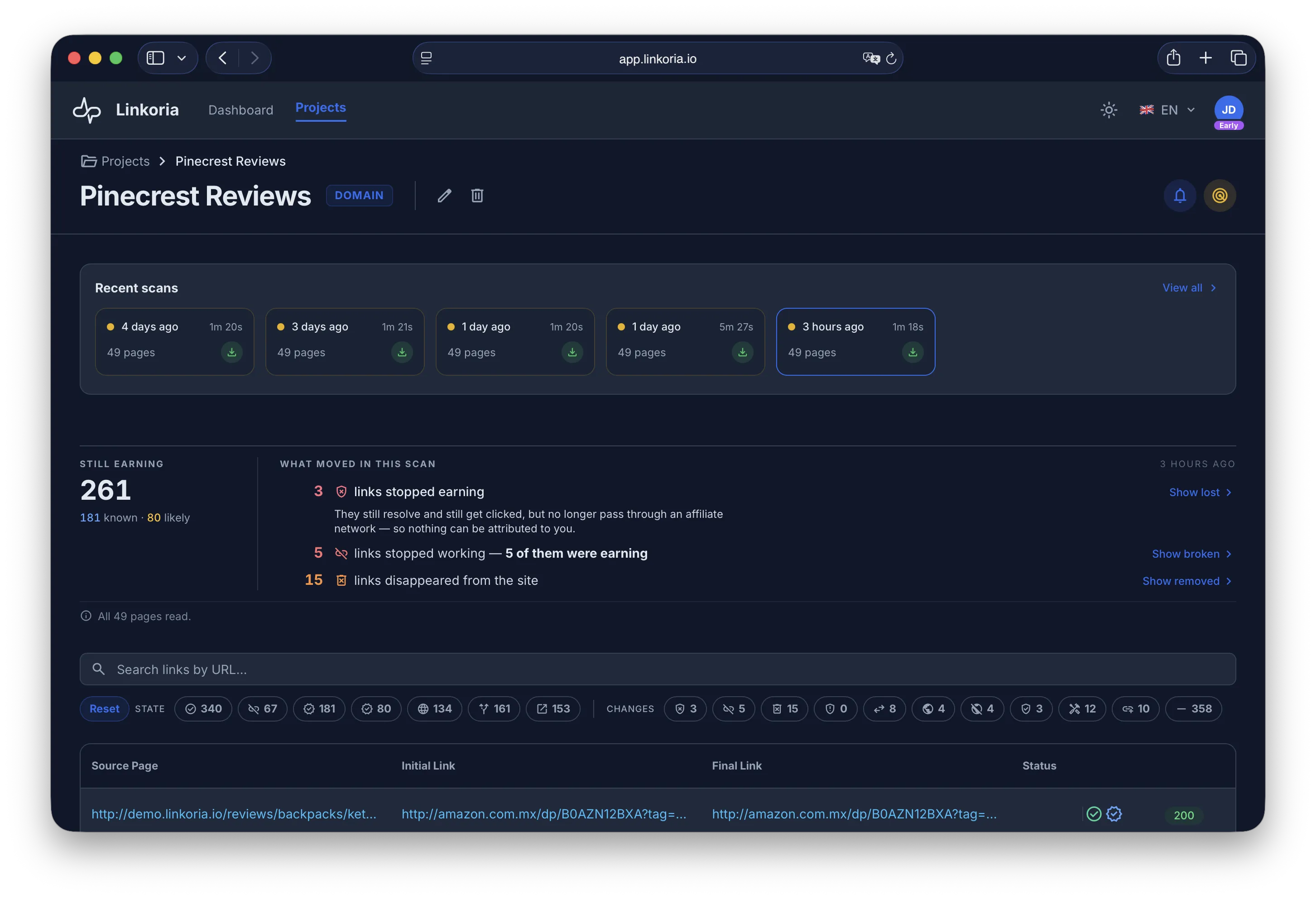
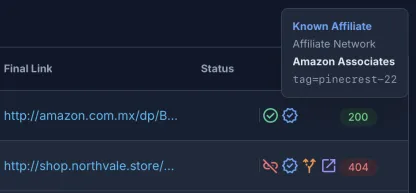
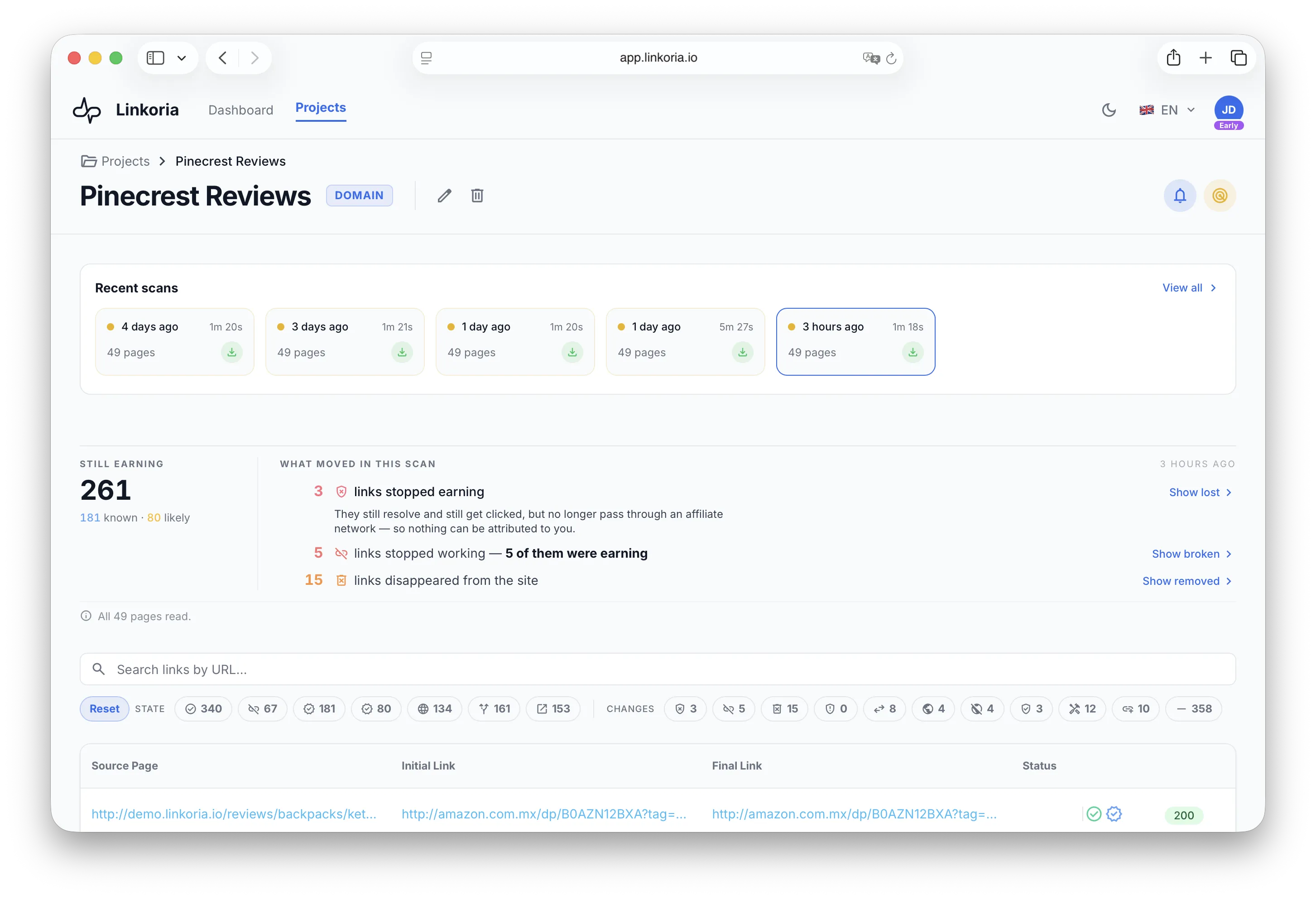
The Linkoria project page: how many links are still earning, what moved in the latest scan, and every outbound link found on the site with the destination it resolves to, its affiliate network and its status.

The failures you cannot see

A link checker tells you a URL responds. That is the easy half.

The ways affiliate revenue leaks are mostly invisible to a crawler that only looks at status codes.

Earns nothing, looks healthy

The link stopped earning

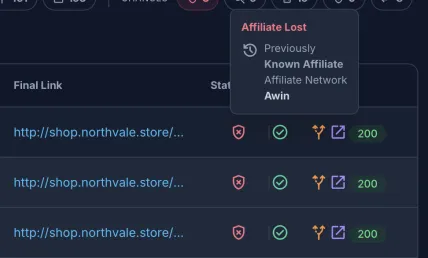
The program ended, or the network stopped honouring the tag, so the click no longer travels through an affiliate network. The link still returns 200. Readers still click. Nothing is attributed to you.

Every click is wasted

The link is broken

A product was delisted, a tracking domain expired, a redirect loops. The page still ranks and still gets traffic β€” it just sends that traffic to an error.

Silently unmonetised

The link is gone

An edit, a plugin update, or a template change dropped a link out of the page. Nothing errors, because there is nothing left to error.

How it works

Three steps, then it repeats on its own.

  1. 1

    Point it at your site

    A whole domain, a single sitemap, or one page. A domain is read through your sitemaps β€” the ones listed in your robots.txt, or at /sitemap.xml β€” so a domain scan needs a sitemap. Linkoria does not crawl from link to link.

    yoursite.com
    robots.txtsitemap.xml
    • /best-tents
    • /gear-guide
    • /winter-kit
    • …
  2. 2

    Every link is followed to its real destination

    Not just the href β€” the entire redirect chain, hop by hop, to the URL a reader ends up on. Each link is then classified by affiliate network.

    • yoursite.com/best-tents
    • go.awin.com/cread?awinmid=…302
    • merchant.com/tents/x2200 OKAwin
  3. 3

    Each scan is compared to the last one

    You get what moved, worst first β€” then everything else. Not another full list to re-read.

    since your last scan

    • stopped earning/best-tents
    • broken/gear-guide
    • gone/winter-kit
    • everything else, unchanged

Coverage

The networks it names.

Matched by tracking domain and required parameters, not by guesswork β€” so a link is reported under the network it actually runs through.

  • Amazon Associates13 locales
  • Awin
  • CJ Affiliate
  • ShareASale
  • Impact
  • Rakuten
  • Skimlinks
  • ClickBank
  • Partnerize
  • Pepperjam
  • Webgains
  • Admitad
  • Tradedoubler
  • Effiliation
  • eBay Partner Network

…and anything else carrying tracking parameters is flagged as a likely affiliate link.

Features

What is in it.

Everything below comes from a real scan of our demo site.

01 / 10

Every scan opens with a reading

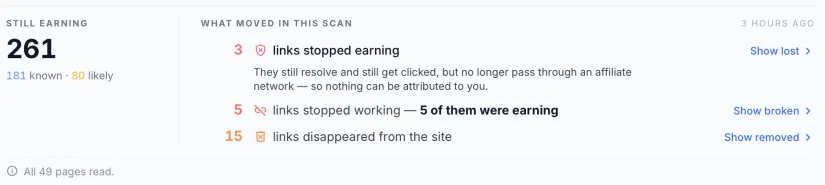
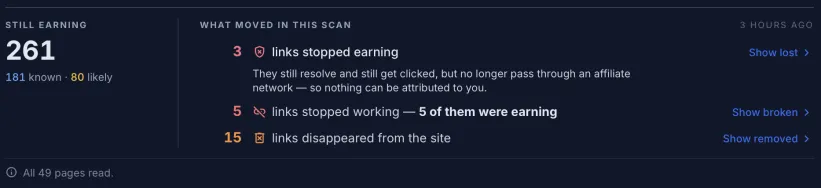
How many of your links are still earning, and what moved since the last scan β€” money lost first, then breakage, and how many of the broken ones were earning before they broke. Every row is a way straight into exactly those links.

02 / 10

Search by where a link ends up

The search box matches three things at once: the page a link sits on, the URL written into that page, and the destination it actually resolves to. So β€œwhich of my pages still point at a merchant that went dark” is one query. Beside it sits a chip for every state and every kind of change, each carrying its own count for the search you have typed β€” you see how many there are before you click one.

03 / 10

Links that stopped earning

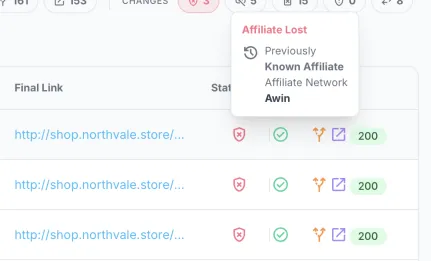
The check Linkoria ranks above every other. When most of them ran through the same network, or sit on the same page, the summary names that network and that page on the spot β€” the cause, not just the count.

04 / 10

Destination changes

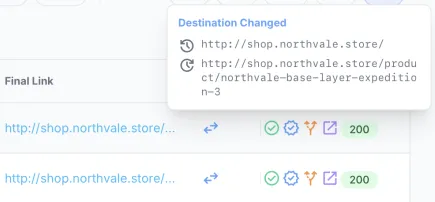
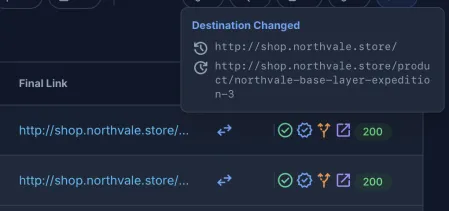
This link resolved somewhere else last week. It may be a renamed product, it may be the first sign of a hijack β€” the scan cannot tell which, so it reports it without raising an alarm.

05 / 10

Affiliate networks named

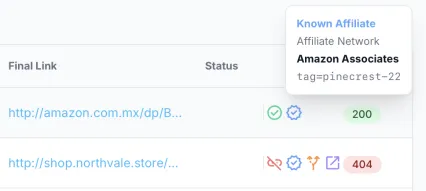
Amazon Associates (13 locales), Awin, CJ Affiliate, ShareASale, Impact, Rakuten, Skimlinks, ClickBank, Partnerize, Pepperjam, Webgains, Admitad, Tradedoubler, Effiliation, eBay Partner Network β€” matched by tracking domain and required parameters, so each link carries its network by name rather than a guess.

06 / 10

Likely-affiliate detection

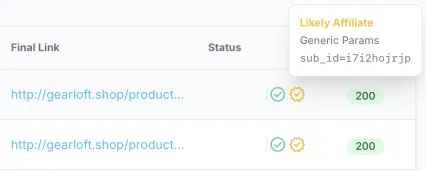
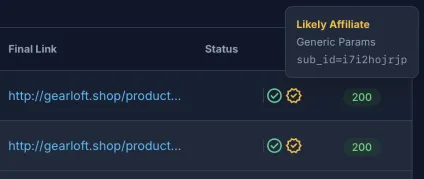
Links that carry tracking parameters no network claims are flagged separately, so a self-hosted or in-house program is not invisible.

07 / 10

Full redirect chains

Every hop is recorded with its status code, including the ones that never answer.

08 / 10

Scans that repeat on their own

Your plan sets the cadence β€” daily during early access β€” and every project runs on it without you remembering to. Every run stays in the project for 30 days during early access, so you can pick any scan still in that window and read the whole page as it stood that day.

09 / 10

Spreadsheet export

Every link with its chain, status, network and previous values as XLSX, for the work that happens outside a dashboard.

10 / 10

Every site on one screen

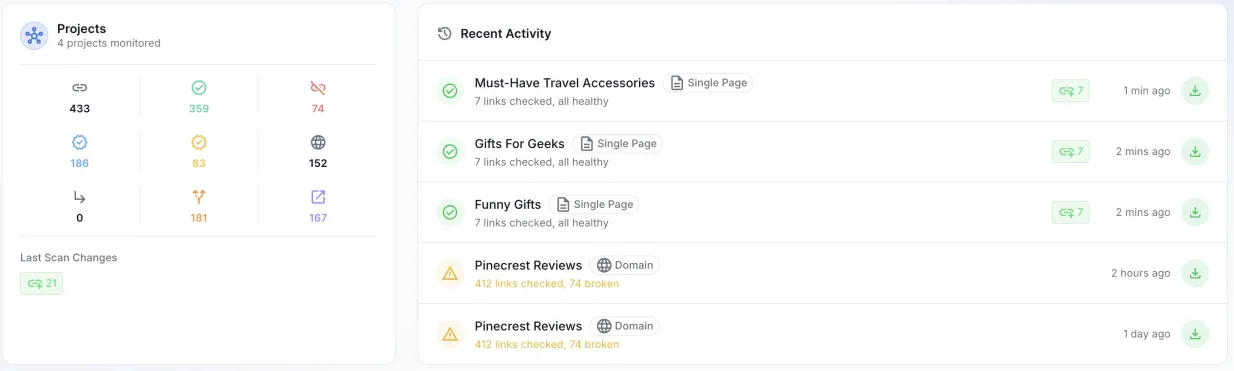
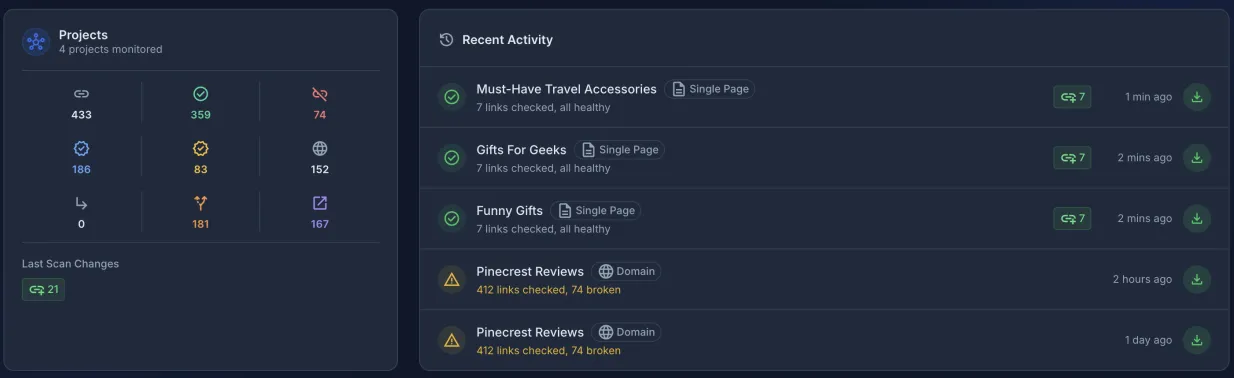
Every project you monitor, added up β€” links still earning, links broken, and every change the latest round of scans turned up. Under it the five most recent scans by name, each carrying its own export and each opening the exact scan it reports rather than the latest one.

Our demo site in the app. Scroll to walk through it.
Every scan opens with a reading

How many of your links are still earning, and what moved since the last scan β€” money lost first, then breakage, and how many of the broken ones were earning before they broke. Every row is a way straight into exactly those links.

Links that stopped earning

The check Linkoria ranks above every other. When most of them ran through the same network, or sit on the same page, the summary names that network and that page on the spot β€” the cause, not just the count.

Destination changes

This link resolved somewhere else last week. It may be a renamed product, it may be the first sign of a hijack β€” the scan cannot tell which, so it reports it without raising an alarm.

Affiliate networks named

Amazon Associates (13 locales), Awin, CJ Affiliate, ShareASale, Impact, Rakuten, Skimlinks, ClickBank, Partnerize, Pepperjam, Webgains, Admitad, Tradedoubler, Effiliation, eBay Partner Network β€” matched by tracking domain and required parameters, so each link carries its network by name rather than a guess.

Likely-affiliate detection

Links that carry tracking parameters no network claims are flagged separately, so a self-hosted or in-house program is not invisible.

Every site on one screen

Every project you monitor, added up β€” links still earning, links broken, and every change the latest round of scans turned up. Under it the five most recent scans by name, each carrying its own export and each opening the exact scan it reports rather than the latest one.

Email reports

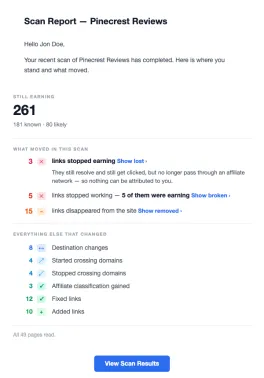
Every finished scan arrives as the same reading the project page shows, in the same words β€” then everything else that moved: destinations, routes, links fixed, added and removed.

Full redirect chains

Every hop is recorded with its status code, including the ones that never answer.

Spreadsheet export

Every link with its chain, status, network and previous values as XLSX, for the work that happens outside a dashboard.

Scans that repeat on their own

Your plan sets the cadence β€” daily during early access β€” and every project runs on it without you remembering to. Every run stays in the project for 30 days during early access, so you can pick any scan still in that window and read the whole page as it stood that day.

Search by where a link ends up

The search box matches three things at once: the page a link sits on, the URL written into that page, and the destination it actually resolves to. So β€œwhich of my pages still point at a merchant that went dark” is one query. Beside it sits a chip for every state and every kind of change, each carrying its own count for the search you have typed β€” you see how many there are before you click one.

Why not a broken-link checker

Broken-link checkers answer a different question.

They were built for navigation links, where a 404 is the only failure that exists. Affiliate links fail in ways that return 200.

A status checkLinkoria
Does this outbound link respond?βœ“βœ“
Where does it actually end up after redirects?β€”βœ“
Which affiliate network is this, by name?β€”βœ“
Did this link stop passing through an affiliate network?β€”βœ“
Did the destination change since last time?β€”βœ“
Which of my broken links were actually earning?β€”βœ“

Linkoria checks outbound links only β€” not internal ones, and not links a page injects with JavaScript. It reports where your links go; a full site crawl or an SEO audit is a different job.

Who it is for

Built for people whose links are the product.

each mark is one monetised link

Review and comparison sites

one domain, years deep

Hundreds of monetised links across hundreds of articles, most of them written years ago and never revisited.

Niche site owners and portfolios

several domains at once

Several properties, no time to audit any of them by hand, and revenue that drops without an obvious cause.

Content teams and agencies

domains that are not yours

Publishing on behalf of clients, where a link that quietly stopped paying is something the client finds before you do.

FAQ

Questions worth asking first.

What does early access cost?Nothing

Nothing. Linkoria is free while it is in early access, with the capacity the next answer states rather than without limits. We will introduce paid plans later, and there will still be a free plan when we do. We will tell existing accounts before that happens rather than surprising you with a bill.

How big a site can it handle?1,000 pages a scan

An early access account covers 5 projects, up to 1,000 pages in a scan, 10 scans a day and 30 days of scan history, with spreadsheet exports included. A site with more pages than that is still scanned β€” the first 1,000 pages its sitemap lists β€” and the scan states how much of the site it read, so a partial count is never presented as a whole one. If your site is larger and you want all of it covered, tell us.

How often does it scan?Daily, in early access

The cadence comes with the plan rather than being something you set. Every project on an early access account is scanned daily; on the free plan it will be weekly. There is nothing to configure, and you can always start a scan yourself in between.

What happens after I sign up?A scan starts

You pick what to scan β€” a domain, a sitemap or a single page β€” give it a URL and a name, and the first scan starts on the spot. The project page shows it running. How long it takes depends on how many pages the site has and how fast it lets us read them: minutes for a small site, longer for a large or a slow one. You do not have to wait on the page β€” when the scan finishes, its report is emailed to you.

Do I need to install anything on my site?No

No. There is no plugin, no script tag and no snippet. Linkoria reads your site the way a search engine does, from the outside.

Will scanning slow my site down?No

No. Requests are rate limited and spread out, and when we crawl your pages the bot identifies itself, so you can see it in your logs or block it in robots.txt if you ever want to. It does not log in, execute JavaScript, or collect personal data from your pages.

About LinkoriaBot
How does it know a link is an affiliate link?Two ways

Two ways. Known networks are matched against their tracking domains and required parameters, so the network is named. Anything else carrying tracking parameters is flagged as a likely affiliate link, so in-house programs still show up.

What does "stopped earning" mean?It earns nothing

The link still resolves and readers still click it, but it no longer passes through an affiliate network β€” the tracking parameters are gone, or the network no longer answers for it. It looks healthy from the outside and earns nothing. This is the finding Linkoria ranks above every other.

What counts as a destination change?It lands somewhere new

The link resolved to one URL on your previous scan and a different one now, after following every redirect. Sometimes that is a renamed product, sometimes a program quietly ending β€” so it is reported as information rather than as damage. Whether it cost you anything is what the earning check answers.

What if some of my pages cannot be read?Coverage is stated

Every scan states its own coverage: how many of your pages were read, and why the rest were not. A count taken from part of a site is labelled as such, so you never read a number as complete when it is short.

What if my site has no sitemap?Point it at a page

A domain scan finds its pages through your sitemaps β€” the ones listed in your robots.txt, or at /sitemap.xml. There is no crawl from link to link, so a domain with no sitemap turns up nothing. Publish one, which every major CMS does for you, or point Linkoria at a sitemap URL or a single page instead.

Can I scan a site I do not own?Only if authorised

You should only scan sites you own or are authorised to check. That is a condition of using the service, and it is your responsibility, not something we can verify for you.

Where is my data stored?In the EU

On servers in the European Union. What we store and for how long is set out in the privacy policy.

Find out which of your links stopped paying.

Point Linkoria at one site and run a scan. The first one tells you where every outbound affiliate link actually ends up.

Scan your first site

Free during early access.